| Symptom |
Cause / Remedy |
| The tool does not function at all |
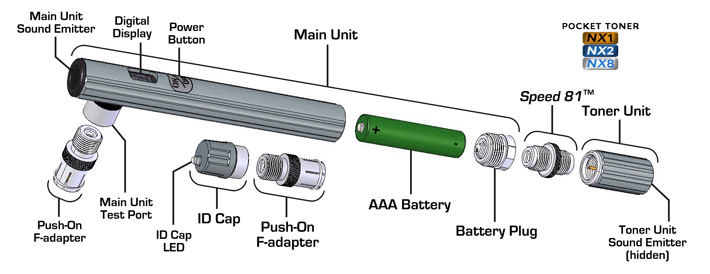
Be sure device is turned on - press the "ON/OFF" button briefly to turn it on. (PTNX2 or PTNX8 only - PTNX1 is always in a ready state as there is no power switch.)
Battery may be installed incorrectly - it should be inserted into the Main Unit positive end first.
Battery may be low or dead - try replacing the battery.
|
| While testing, the sound from the Main Unit Sound Emitter shuts off after one second (PTNX2 & PTNX8 only) |
This is normal. Unlike the PTNX1, the PTNX2 and PTNX8 only emit a tone from the Main Unit Sound Emitter for one second whenever the condition on the test cable changes. |
Digital Display on the Main Unit indicates the wrong ID Cap number - i.e., when connected to ID Cap #3 the display shows the number "2"
(PTNX8 only) |
Be sure Main Unit and ID Cap are firmly connected to the test cable ends. Weak connections can give false readings.
Disconnect the Main Unit from the test cable, turn it off, wait at least 30 seconds, then turn it back on again and resume testing.
|
Toner Unit makes no sound when connected to the Main Unit Test Port
|
Confirm device is turned on - press the "ON/OFF" button briefly to turn it on. (PTNX2 or PTNX8 only - PTNX1 is always in a ready state as there is no power switch.)
Battery may be installed incorrectly - it should be inserted into the Main Unit positive end first.
Battery may be low or dead - try replacing the battery.
Be sure Main Unit and Toner Unit are firmly connected to the test cable ends. Weak connections can give false readings.
Try gently tapping the Toner Unit on a wood surface and then test it by connecting it directly to the Main Unit - Toner Unit should emit a tone.
|